
Synopsis
monoSID is a software synthesizer for the Commodore 64. The C64's sound chip is called the SID. A synthesizer that plays only one note at a time is known as a monophonic synthesizer, or mono synth for short—hence the name monoSID.
It can be played via MIDI (the C64 requires a compatible MIDI cartridge) or by using the built-in keyboard piano. The keyboard piano is intended only as a simple fallback; MIDI is the primary and recommended way to play.
Features
- Runs on real Commodore 64 hardware and in emulators such as VICE.
- Written entirely in assembly language; the executable is only 20 KB.
Supports MIDI via the following MIDI cartridges:
- Sequential
- Passport/Syntech
- DATEL/Siel/JMS
- Namesoft
- Maplin
- Automatically detects any supported MIDI cartridge that is installed.
- Three-voice monophonic synthesizer.
- Each voice can use a different waveform (triangle, sawtooth, pulse/square, or noise), pulse width, and ADSR envelope.
- All three voices share a filter that can operate as a low-pass, high-pass, or band-pass filter.
- The three oscillators can be detuned relative to each other in one-cent increments (1–4095 cents).
- Each oscillator can optionally be reset individually when a note is triggered.
Optional LFO (triangle or square waveform) with three modulation destinations:
- Pitch
- Pulse width
- Filter cutoff
- LFO cycle length from 0.01 seconds up to approximately 40.95 seconds.
- 64 user-selectable patches that can be saved to disk.
- Selectable MIDI channel (1–16 or Omni mode).
- Supports MIDI pitch bend (±1 whole tone).
- Optional support for MIDI Note-On velocity.
- Ten-note key buffer. When a key is released, the previously held note is automatically resumed if it is still pressed.
- Open source (GNU GPLv3).
Download
- Download the assembled PRG file.
- Or download a ready-to-use D64 disk image.
- Or browse the source code (written in Kick Assembler) on GitHub.
How to Run
Running in VICE
- Download and install VICE (https://vice-emu.sourceforge.io) if necessary.
- Download the disk image (monosid.d64).
- Start the C64 emulator.
- Open Preferences → Settings → Cartridges → MIDI Emulation.
- Enable MIDI Emulation.
- Select Sequential as the MIDI mode.
- Choose your MIDI keyboard or other MIDI input device under MIDI In.
- Drag and drop the downloaded D64 image onto the VICE window, or load it using VICE's menus.
- Enjoy!
Running on Real Hardware
If you own a real Commodore 64, the easiest way to load monoSID is by using an SD2IEC drive.
Copy monosid.prg to an SD card and load it from the C64 as you would any other program.
To use MIDI, you will need one of the five supported MIDI cartridges (Sequential, Passport/Syntech, DATEL/Siel/JMS, Namesoft, or Maplin).
If you would like to purchase a newly manufactured cartridge, an Australian company called GameDude Computers Consoles Retro currently sells replica DATEL cartridges on eBay.
Note: This documentation was written in 2026. By the time you read this, the company—or even eBay itself—may no longer exist. Who knows?
Insert the MIDI cartridge before starting monoSID. The program will automatically detect the cartridge during startup.
User Interface
Overview
The main interface is organized into groups of controls called modules. Each module contains several editable parameters.
At any given time, one control has the input focus. The focused control is highlighted in yellow. You can move the focus using either the cursor keys or the WASD keys, which are often more convenient on an original Commodore 64 keyboard.
monoSID provides five different types of controls:
- Waveform selectors
- 4-bit numeric fields
- 11-bit numeric fields
- 12-bit numeric fields
- Boolean fields (checkboxes)
The available input methods depend on the selected control:
- Return changes the value of the currently selected control.
- + and - increment or decrement numeric values.
- Space toggles waveform selectors and checkboxes.
The user interface is divided across two pages. Hold W or S for a while to switch between them or use the F5 and F7 keys.
The first control element of each module can be selected by pressing SHIFT + the first letter of the module name (in the case of the voices use the numbers 1-3 instead).
Modules Page 1
The modules on the first page correspond closely to the registers of the SID sound chip. One of the primary goals of monoSID was to provide a convenient interface for experimenting with the SID's hardware registers without having to manipulate them directly.
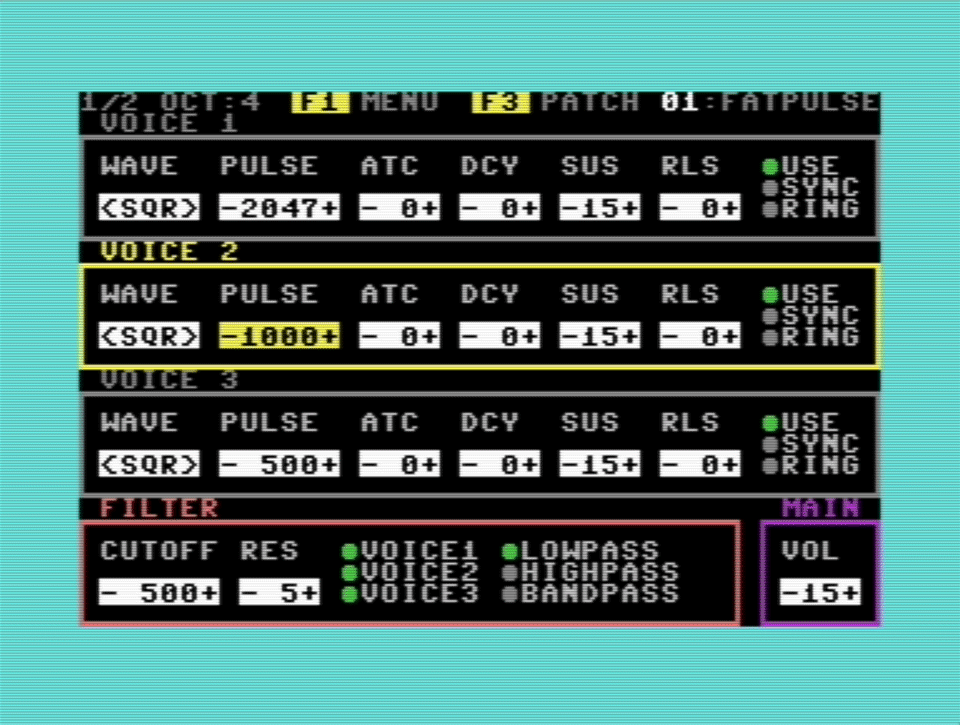
Voice Modules (Voice 1–3)
Each voice has its own oscillator and envelope generator.
Keyboard shortcut: SHIFT + 123
WAVE
Selects the oscillator waveform:
- Triangle
- Sawtooth
- Pulse (Square)
- Noise
PULSE
Controls the pulse width when the waveform is set to Pulse.
The value ranges from 0 to 4095 (11-bit resolution). A value of 2047 corresponds approximately to a 50% duty cycle.
ATC
Attack time of the ADSR envelope.
DCY
Decay time of the ADSR envelope.
SUS
Sustain level.
RLS
Release time.
USE
Enables or disables the voice.
SYNC
Synchronizes this oscillator with another SID oscillator using the hardware sync feature.
RING
Enables hardware ring modulation.
Ring modulation only affects the triangle waveform. It has no effect when the voice is using pulse, sawtooth, or noise.
SID ADSR Time Table
| Value | Attack | Decay | Release |
|---|---|---|---|
| 0 | 2 ms | 6 ms | 6 ms |
| 1 | 8 ms | 24 ms | 24 ms |
| 2 | 16 ms | 48 ms | 48 ms |
| 3 | 24 ms | 72 ms | 72 ms |
| 4 | 38 ms | 114 ms | 114 ms |
| 5 | 56 ms | 168 ms | 168 ms |
| 6 | 68 ms | 204 ms | 204 ms |
| 7 | 80 ms | 240 ms | 240 ms |
| 8 | 100 ms | 0.3 s | 0.3 s |
| 9 | 0.25 s | 0.75 s | 0.75 s |
| 10 | 0.5 s | 1.5 s | 1.5 s |
| 11 | 0.8 s | 2.4 s | 2.4 s |
| 12 | 1 s | 3 s | 3 s |
| 13 | 3 s | 9 s | 9 s |
| 14 | 5 s | 15 s | 15 s |
| 15 | 8 s | 24 s | 24 s |
Oscillator Routing
The SID hardwires oscillator synchronization and ring modulation internally.
| Destination | Source |
|---|---|
| Voice 1 | Voice 3 |
| Voice 2 | Voice 1 |
| Voice 3 | Voice 2 |
Understanding SYNC
When SYNC is enabled, the selected oscillator resets its phase every time the source oscillator completes a cycle.
This forces both oscillators into a fixed phase relationship and creates the characteristic "sync lead" sound that became popular in many classic synthesizers. The effect is most noticeable when sweeping the pitch of the synchronized oscillator while the source oscillator remains at a lower frequency.
Understanding Ring Modulation
Unlike its name suggests, the SID's ring modulation does not perform true analog ring modulation.
Instead, it modifies only the triangle waveform by XOR'ing the most significant bit of the selected oscillator with that of its source oscillator.
As a result:
- Ring modulation affects only triangle waveforms.
- Sawtooth, pulse, and noise waveforms are unaffected.
- The modulation source follows the same fixed routing used for oscillator synchronization.
- SYNC and RING can be enabled simultaneously.
Filter
All three voices share a single multimode analog filter.
Keyboard shortcut: SHIFT + F
CUTOFF
Sets the cutoff frequency.
Range: 0–2047
Approximate frequency range:
- 0 → 20 Hz
- 2047 → 22 kHz
RES
Sets the filter resonance.
Higher values increasingly emphasize frequencies around the cutoff frequency.
VOICE 1–3
Determines whether each voice is routed through the filter.
LOWPASS
Passes frequencies below the cutoff frequency while attenuating higher frequencies.
HIGHPASS
Passes frequencies above the cutoff frequency while attenuating lower frequencies.
BANDPASS
Passes only a narrow frequency band around the cutoff frequency.
Main
Keyboard shortcut: SHIFT + M
VOL
Master output volume.
Range: 0–15
- 0 = Silent
- 15 = Maximum volume
Modules Page 2
The second page contains features that extend beyond the SID's hardware registers and turn monoSID into a more practical musical instrument. Here you'll find functions such as oscillator detuning, velocity response, LFO configuration, and oscillator reset options.
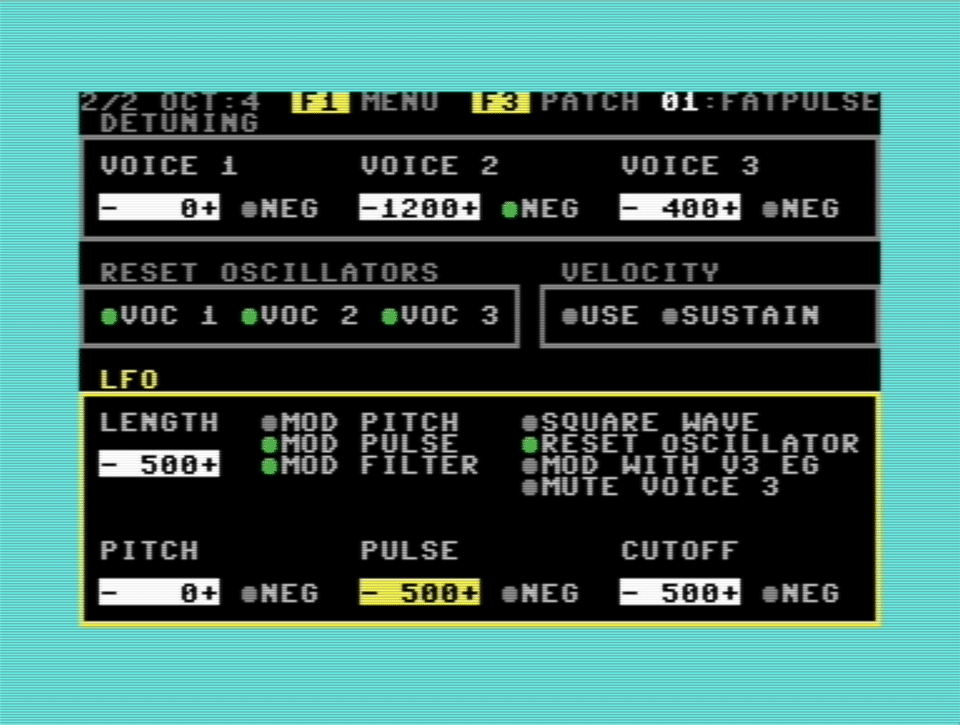
Detuning
Detuning allows each oscillator to be shifted independently from the played note. This is useful for creating thicker sounds, chorusing effects, intervals, or simple chords.
Keyboard shortcut: SHIFT + D
VOICE 1–3
Detuning amount in cents.
Range: 0–4095 cents
One cent equals one hundredth of a semitone.
NEG 1–3
Makes the corresponding detuning value negative.
How Detuning Works
Each voice can be detuned independently relative to the incoming MIDI note.
Small detuning values create the familiar "beating" effect between oscillators, making the sound richer and wider.
Larger values can be used to create harmonic intervals:
- 100 cents = one semitone
- 700 cents = perfect fifth
- 1200 cents = one octave
For example:
- Detune Voice 2 by -1200 cents to create a classic sub-oscillator.
- Use detuning values of 0, 300, and 700 cents to build simple chords from a single key press.
Reset Oscillators
Keyboard shortcut: SHIFT + R
VOICE 1–3
Resets the selected oscillator whenever a new note begins.
Why Reset the Oscillator?
Normally, a SID oscillator continues running continuously, regardless of whether a key is currently pressed.
When oscillator reset is enabled, the oscillator starts from the same phase each time a new note begins. This produces a more consistent attack and is particularly useful for percussive sounds and bass patches.
Leaving oscillator reset disabled produces a more natural, analog-style behavior, as each note begins at a different phase of the waveform.
Gate Behavior
Understanding the SID's gate signal helps explain when oscillator reset and envelope triggering occur.
- When no key is pressed, the gate is closed.
- Pressing the first key opens the gate and starts the ADSR envelope.
- Holding one key while pressing additional keys does not reopen the gate.
- The gate closes only after the final held key has been released.
Consequently, oscillator reset occurs only when the gate opens—not for every overlapping note.
Velocity
monoSID optionally supports MIDI Note-On velocity.
Keyboard shortcut: SHIFT + V
USE
Enables velocity sensitivity.
The velocity of each incoming MIDI note determines how loudly the note is played. The SID's master volume is modulated with the calculated value.
SUSTAIN
Instead of controlling the SID's master volume, velocity modifies the Sustain level of all three voices.
Why Is Velocity Implemented This Way?
Unlike modern synthesizer chips, the SID does not provide an individual volume control for each voice.
The only available volume control is the chip's global master volume register.
Changing this register while a note is playing produces the characteristic SID volume click. Larger volume changes result in more audible clicks.
This behavior is less pronounced on later SID revisions (such as those found in the Commodore 64C), but it never disappears completely.
To work around this limitation, monoSID offers the SUSTAIN option.
When enabled, Note-On velocity modifies the Sustain level of each voice instead of the global volume. This greatly reduces audible clicking but works best when the ADSR envelopes are configured with minimal Attack, Decay, and Release times.
Neither solution is perfect, but they represent the best compromises within the hardware limitations of the SID.
LFO (Low-Frequency Oscillator)
The LFO periodically modulates selected synthesis parameters, allowing monoSID to produce vibrato, tremolo-like effects, pulse-width modulation, filter sweeps, and many other animated sounds.
Keyboard shortcut: SHIFT + L
LENGTH
LFO cycle length.
Range: 0–4095
- 0 = Disabled
- 1 = 0.01 seconds (100 Hz)
- 4095 = 40.95 seconds
MOD PITCH
Applies pitch modulation to all three voices.
MOD PULSE
Applies pulse-width modulation to all three voices.
MOD FILTER
Applies modulation to the shared filter cutoff frequency.
SQUARE WAVE
Selects a square-wave LFO.
If disabled, the LFO uses a triangle waveform.
RESET OSCILLATOR
Resets the LFO whenever the gate opens.
This ensures that each newly played note begins at the same point within the modulation cycle.
MOD WITH V3 EG
Uses the ADSR envelope generator of Voice 3 to modulate the LFO itself, allowing for more dynamic modulation effects.
MUTE VOICE 3
Silences Voice 3 while still allowing its envelope generator to control the LFO.
This makes Voice 3 function purely as a modulation source.
PITCH
Maximum pitch modulation depth.
Measured in cents.
PULSE
Maximum pulse-width modulation depth.
CUTOFF
Maximum filter cutoff modulation depth.
NEG
Inverts the modulation polarity for the corresponding destination.
Main Menu
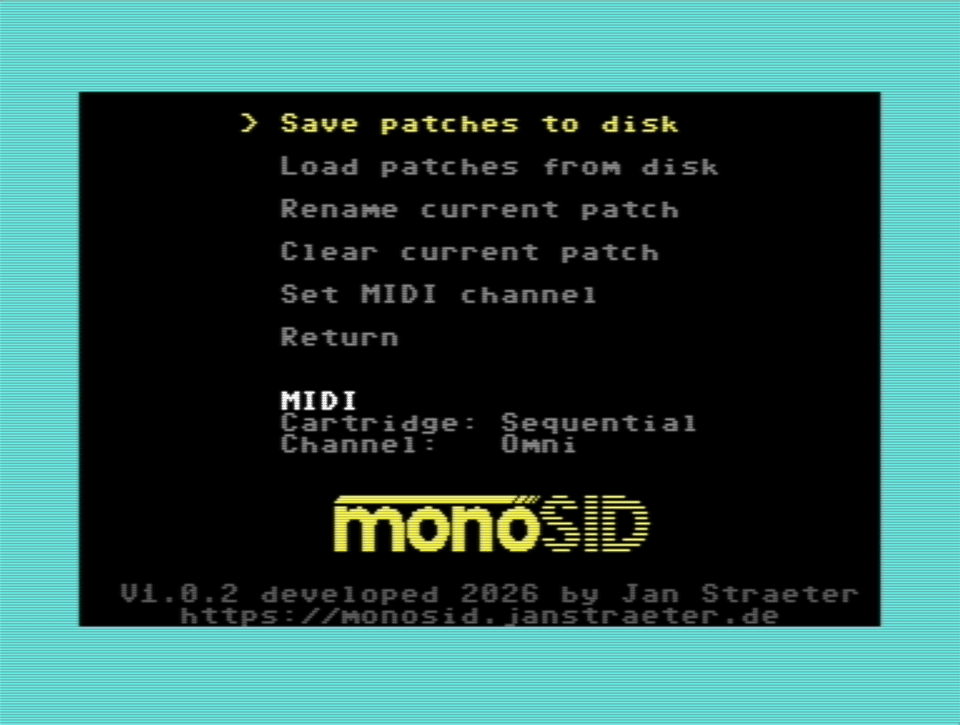
Press F1 to open the main menu.
Navigate using either the cursor keys or the WASD keys. Press Return to execute the highlighted menu item or press F1 again to leave the menu without making any changes.
In addition to displaying information about the detected MIDI cartridge and the currently selected MIDI channel (default: Omni), the menu provides the following functions:
Save Patches to Disk Saves all 64 patches to disk. A disk drive must be connected, and a writable disk must be inserted. The file is always saved as USR file called MONOSID-PATCHES.
Note: An existing file with the same name will be overwritten without confirmation.
Load Patches from Disk Loads previously saved patches from disk.
Rename Current Patch Prompts for a new name for the currently selected patch.
Clear Current Patch Resets the current patch to its default settings.
Set MIDI Channel Selects the MIDI channel monoSID listens to (1–16 or Omni).
Return Returns to the main synthesizer screen.
Patch Selector
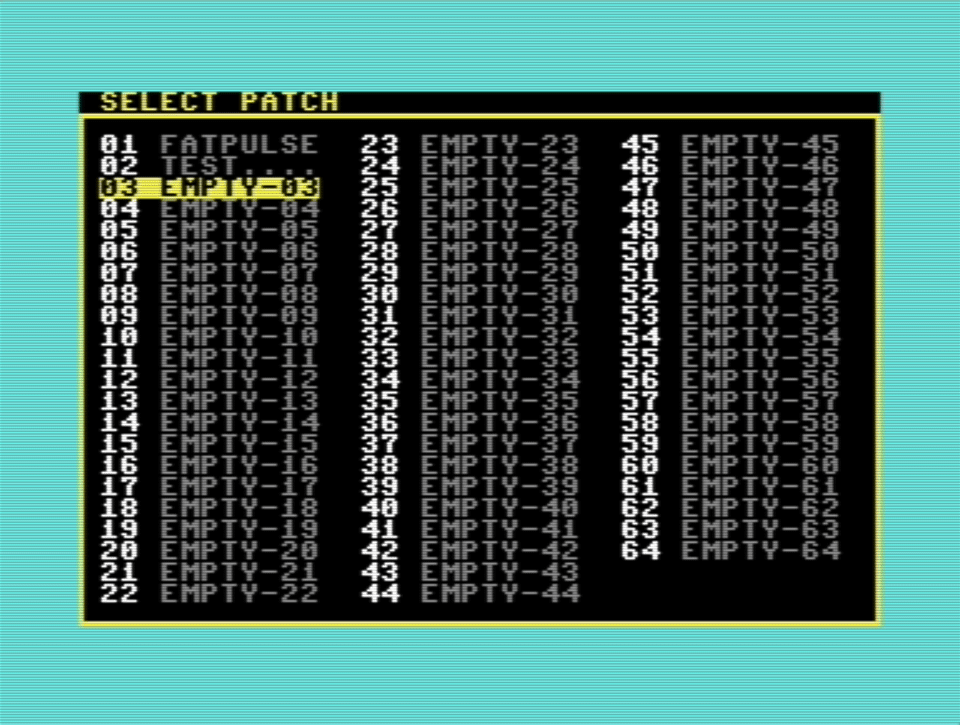
Press F3 to open the Patch Selector.
Navigate using either the cursor keys or the WASD keys. Press Return to load the highlighted patch.
Press F3 again to return to the main screen without changing the current patch.
Miscellaneous
The keyboard piano
Instead of MIDI you can use the C64's keyboard to play. The following keys equal one octave from C to C:
The SID chip has a range of 8 octaves. To switch which octave to play (C0 to C7) use the number keys:
12345678
The currently selected octave is displayed at the top of the screen.
Hanging notes
Panic button to the rescue
As MIDI sends seperate messages for note-on and note-off it can happen that a note-off message gets lost somewhere down the line. This results in a hanging note. Which can be very annoying.
In my tests this never happened on the real hardware. But in the emulator it sadly happened frequently. I am not sure what causes the problem. Maybe the MIDI emulation in VICE, maybe Windows, maybe my own code.
To get to the bottom of this problem I would need to spend even more time than I already spent on this project. This is a rabbit hole I decided to not go down (at least for now).
As a workaround I included a "panic button" which ends the currently playing note and clears the MIDI note buffer.
If you experience a hanging note press the X key.
A Few Personal Words
Why?
Yeah. Why — oh why — did I decide to build a software synthesizer for an obsolete old computer, and to do it purely in 8-bit assembly?
Well, because... I like pain, I guess? Just kidding, of course. Although — as Dave Plummer of Dave's Garage once put it on his YouTube channel — programming is mostly frustration management. Which is very true. And there's plenty of frustration to go around, especially when you're developing for a machine running at a little under 1 MHz with 64 KB of RAM.
But it was also fun — and deeply humbling. I had to go back to the basics: reminding myself how numbers work at the bit level, writing super low-level code, even developing my own subroutines to convert an integer into a string and back again. The kind of thing you NEVER have to worry about in a modern programming environment.
Still, going back to basics (and a 6502 processor is about as basic as it gets) wasn't the only reason. There was a healthy dose of nostalgia, too. I started programming at the age of 12 on — you guessed it — an old C64 my father gave me. At first I just played games on it, as you'd expect. But then the disk drive — the original 1541, in all its bulky, beige glory — broke down. Out of sheer boredom, I picked up the manual that came with the C64, which taught the basics of programming in, well, BASIC. After writing my first tiny, simple little BASIC programs (and saving them to a cassette drive, since the 1541 was still dead), I was hooked. I fell in love with programming, and it's been my passion ever since. In my teens I taught myself x86 assembly so I could write cool DOS games. But I never touched C64 assembly back then — I was an absolute noob at 12 — so 35 years later, I decided to finally do some "real" coding on the C64.
The nostalgia trip was rewarding in itself, but I also wanted to learn something useful for the future — ideally toward building more capable, modern software synthesizers (a plan I still haven't realized). MIDI remains the standard language electronic instruments use to talk to each other, so learning it at a low level seemed like a smart move. That said — while I do like pain, as established — I don't like it that much, so I opted for a modern workflow and an emulator (VICE) rather than authentic 80s tools, which would have been a bit too hardcore for me. In the end, I used Kick Assembler (by Mads Nielsen), Visual Studio Code, and a plugin called "Kick Assembler 8-Bit Retro Studio" (by Paul Hocker) to automate assembling and launch VICE with a single keystroke. I have the utmost respect for the folks in the 80s who built complex programs with the archaic tools of the day. It must have been a real struggle.
So in the end, this little synthesizer project brought together old and new technology, stirred up plenty of nostalgia, made me relearn things I'd forgotten, and taught me new things I hope to use down the road.
One very modern twist I hadn't anticipated at the outset was my use of AI. Over the past few months, I leaned on Claude AI a lot — mostly for research, but also for debugging some genuinely tricky problems. It's frightening how good these systems have become. Incredibly useful, too. But still... a little frightening.
All in all, I had a lot of fun (with some deeply frustrating moments sprinkled in) working on this project. Was it worth all the hours I poured into it? The "product" itself, probably not — but I learned a ton. And as the saying goes: "Time you enjoyed wasting is not wasted." So, yeah. That's that. Have a nice day!